Time tracking

Time tracking for freelancers, as simple as your calendar

Tracking hours should not be an evening chore. In Finq you click a day in the calendar, pick your project and enter your hours. Done. At the end of the month your hours land on the invoice automatically, specification included.

Free in Finq, without limits and without a trial

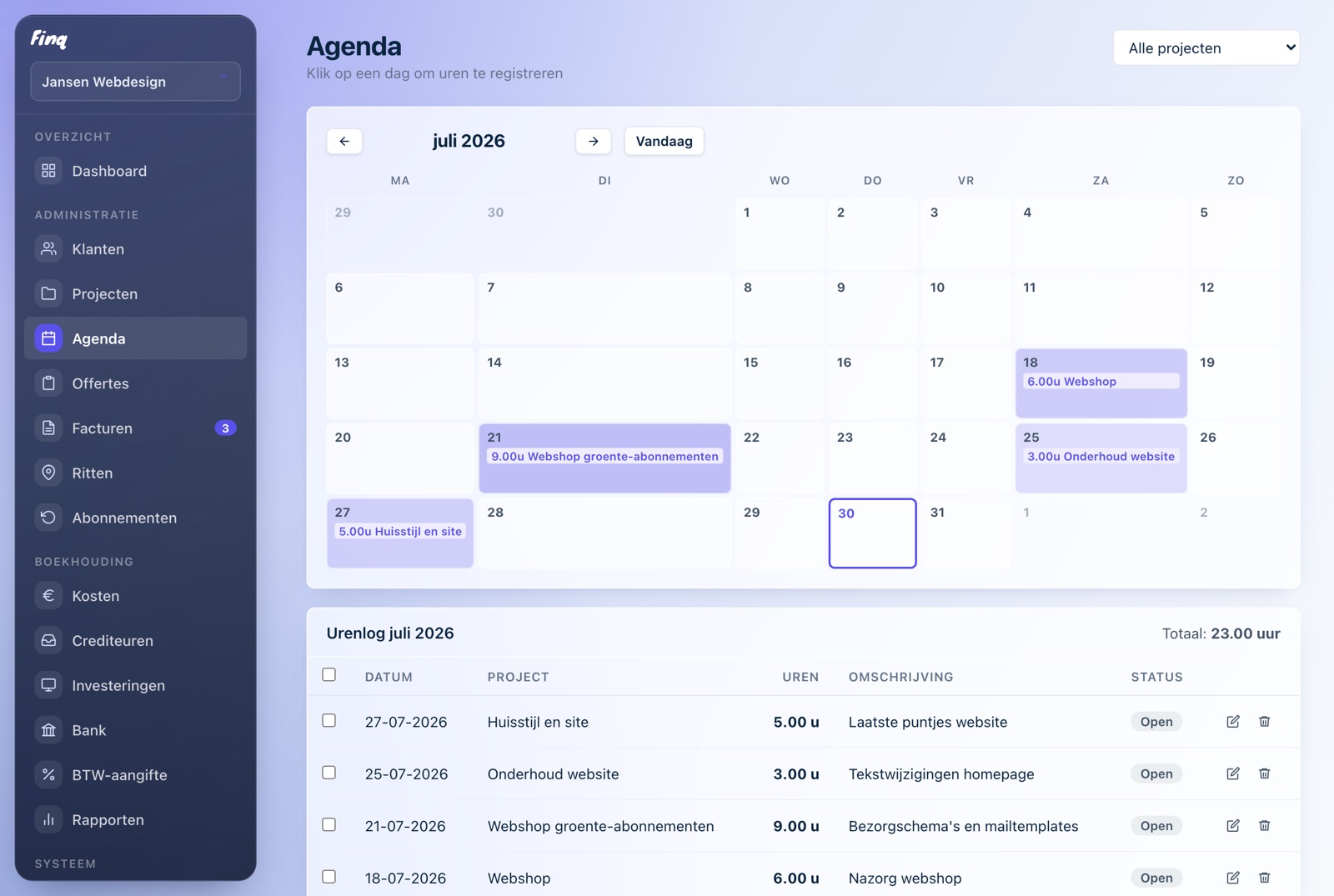
The Finq calendar: a monthly calendar whose days color along with logged hours

A calendar, not a form

You log hours the same way you plan appointments: in a monthly calendar. Days are tinted by how much you worked, so you spot unfilled days at a glance.

Per client and per project

Every hour belongs to a project with its own hourly rate. Working for three clients? You see exactly how many hours each one takes and what they are worth.

A log with monthly totals

Below the calendar, the log adds everything up per month and per project. Useful for yourself, and for the Dutch Tax Administration's hours criterion.

On the invoice in one click

Invoicing does not mean retyping. Select the tracked hours and Finq puts them on a PDF invoice, with a tidy time specification attached.

Why track time inside your invoicing app?

Many freelancers track hours in a spreadsheet or a separate app, then retype them into invoices at the end of the month. That works, until you forget a day, copy the wrong rate or lose the spreadsheet. In Finq your hours and invoices are one system: what you track, you can invoice directly.

Because every hour belongs to a project and a client, you also know where your time goes without any math. The dashboard adds up your uninvoiced hours, so billable work never quietly piles up.

The hours criterion: proving 1,225 hours

To claim the Dutch self-employed deduction (zelfstandigenaftrek) you need to show you spend at least 1,225 hours a year on your business. A solid time log is your main evidence. Finq keeps every tracked hour per day, per project and per month, and you can export everything at any time.

Frequently asked questions

Is time tracking in Finq free?

Yes. Time tracking, clients, projects, quotes and invoices are free, forever. You only pay if you also want to do your accounting (expenses, bank, VAT return) in Finq.

Can I export my hours?

Yes, you can download a full export of your administration at any time, including all tracked hours.

Do my hours end up on the invoice automatically?

Yes. When creating an invoice you select a project's uninvoiced hours; they become invoice lines on the PDF, with a per-day time specification attached.

Just try it, you are not locked into anything

Creating an account is free, without payment details. Your first invoice is ready within minutes.