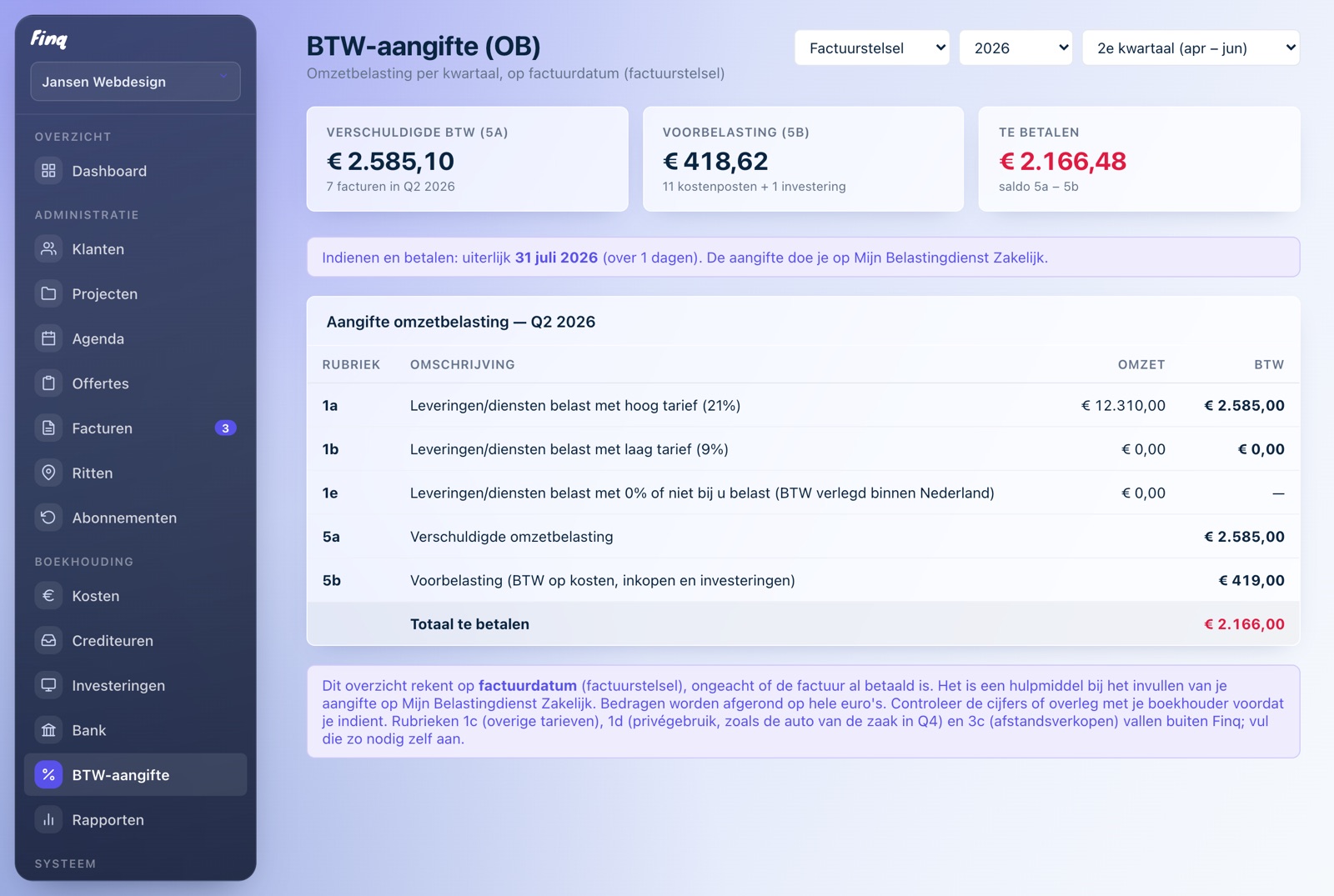
VAT return

VAT returns for freelancers in the Netherlands: copy, not calculate

Every quarter the same ritual: adding up revenue, hunting for input VAT, hoping it is right. Finq turns your invoices and expenses into exactly the boxes of the Dutch VAT return form. You copy the amounts into the Tax Administration's portal, done.

Part of Finq Plus, free to try for 30 days

The Finq dashboard with outstanding invoices, revenue, expenses, and reminders

Per box of the actual form

Finq shows your revenue and VAT in the boxes of the real return: 1a and 1b for domestic revenue, 2a for reverse-charged revenue, 3a and 3b for foreign clients, 4a and 4b for foreign purchases.

Input VAT from your expenses

The VAT on your business expenses and assets automatically counts as input VAT (box 5b). Add the receipt, the VAT is extracted, done.

Reverse charge and abroad covered

If you invoice with reverse-charged VAT or bill clients outside the Netherlands, that revenue lands in the right box automatically, split per client country.

The quarter at a glance

You see per quarter what you owe or get back, well before the deadline. No surprises at the end of April.

How does the VAT return work in Finq?

Everything you do in Finq feeds the return. Every invoice counts toward the revenue boxes, every expense toward input VAT. At the end of the quarter you open the VAT overview, put it next to the Tax Administration's form and copy the amounts. Nothing to calculate, nothing to remember.

The VAT return is part of Finq Plus (with expenses, bank imports and reports). You can try it free for 30 days, without payment details; the trial only starts when you choose to.

Who is this for?

For freelancers who file their own return and are done with spreadsheets, or with paying an accountant for what is essentially copying numbers. If you use the small business scheme (KOR) or have a complex international setup, check with an advisor; Finq gives you the numbers, the decisions stay yours.

Frequently asked questions

Does Finq file the return with the Tax Administration automatically?

No, deliberately not. Finq prepares all amounts in the boxes of the form; you copy them into the Tax Administration portal in a few minutes. You stay in control.

Does Finq include input VAT?

Yes. The VAT on your recorded expenses and assets automatically appears in box 5b as input VAT.

What if I invoice with reverse-charged VAT?

Reverse-charged revenue automatically lands in the right box (2a within the Netherlands, 3a or 3b for abroad), split per client country.

Just try it, you are not locked into anything

Creating an account is free, without payment details. Your first invoice is ready within minutes.